Figures & Captions
LaTeX-style figure numbering: captions auto-prefix with Figure N. and you reference them in prose like any academic write-up.
Markdown figures
Goldmark wraps images with alt text in <figure> / <figcaption>. The theme numbers each caption inside .content.
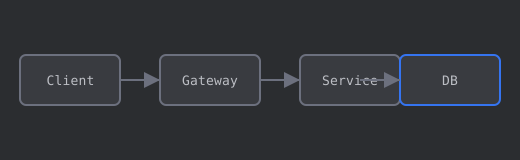
The happy path in Figure 1 is synchronous: the gateway authenticates, forwards to the service, and the service issues a single query. Retries and circuit-breaking are intentionally omitted.
Referencing multiple figures
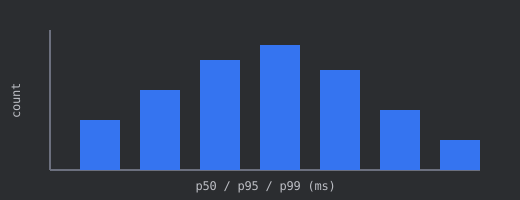
Compare Figure 1 (architecture) with Figure 2 (latency). A flat median with a heavier tail usually means a subset of requests hit a cold cache or contended lock — not a uniform slowdown.
HTML figure with explicit caption
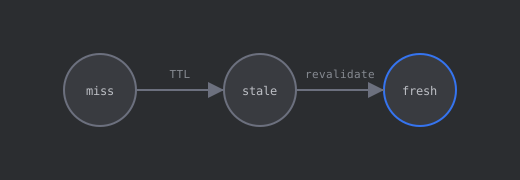
Figure 3 shows the three states we log at the edge. A stale entry may still be served while a background revalidation runs; see Figure 2 for how often that path lands in the p95 bucket.
Caption without alt duplication
When the caption is longer than the alt text, prefer HTML so the accessible name stays short:
Figure 4 repeats the topology from Figure 1 with a caption tailored to the benchmark section — same asset, different context.
Takeaways
- Use
for simple Markdown figures. - Use
<figure>/<figcaption>when alt and caption should differ. - Reference figures by number in prose: “Figure 2”, “Figure 3”, etc. Numbers follow document order.